


To reset the filter light on a Levoit air purifier, simply press and hold the red indicator light or the reset icon on the control panel for three to five seconds. You will hear a quick beep, and the red light will turn off immediately. Always make sure to clean or replace your filter before you perform this reset to keep your air fresh.
Imagine waking up in the morning and walking into your living room. You want to breathe in some fresh, clean air. Instead, you look down at your favorite air purifier. You see a bright red light staring back at you. It is glowing, and it looks like a warning sign. Your first thought might be that the machine is broken. Do not worry. Your air purifier is not broken at all.
In fact, that little light is just doing its job. It is telling you that it is time for a change. But once you change the filter, how do you make that red light go away? It can be a bit confusing if you do not know the exact steps. This guide will show you how to solve this issue in just a few seconds. We will cover different models, quick tricks, and common mistakes to avoid.
Key Takeaways
- Press and hold: You can reset the light by holding the filter icon for three to five seconds.
- Hear the beep: A short beep will sound to let you know the reset was successful.
- Change first: Always put a clean, new filter in the machine before you turn off the light.
- Timer based: The red light is on a timer and does not actually measure how dirty the filter is.
- No washing: Never wash the main True HEPA filter because water will ruin it.
- Power cycle: If the light stays on, unplug the unit for a minute to reset the system.
📑 Table of Contents
Why Does the Levoit Filter Light Turn Red?
Before we turn the light off, let us look at why it came on in the first place. Your Levoit air purifier is a smart machine. It works hard every single day to trap dust, pet hair, pollen, and smoke. Over time, these tiny particles build up inside the filter. If the filter gets too dirty, the machine cannot clean your air very well.
Understanding the Internal Timer
How does the machine know when the filter is dirty? Most Levoit models do not actually check the dust levels on the filter. Instead, they use an internal timer. This timer counts the hours that the machine has been running. Usually, the timer is set for about six to eight months of regular use. Once you hit that limit, the timer triggers the red light. It is a simple reminder for you to check the filter.
The Difference Between Cleaning and Replacing
When the light turns on, you might wonder if you can just clean the filter. Some filters have a fine outer layer called a pre-filter. You can vacuum this outer layer to remove big pieces of dust and hair. However, the main filter inside is a True HEPA filter. This part traps very tiny particles. You cannot wash or vacuum a HEPA filter. Trying to wash it will ruin it. When the red light turns on, it usually means you need a brand-new filter.
How Do You Reset the Filter Light on a Levoit Air Purifier?
Now, let us get to the main question. How Do You Reset the Filter Light on a Levoit Air Purifier? The process is very simple. It only takes a few seconds of your time. Most Levoit models use a touch control panel on the top of the device. Here is how you can do it.
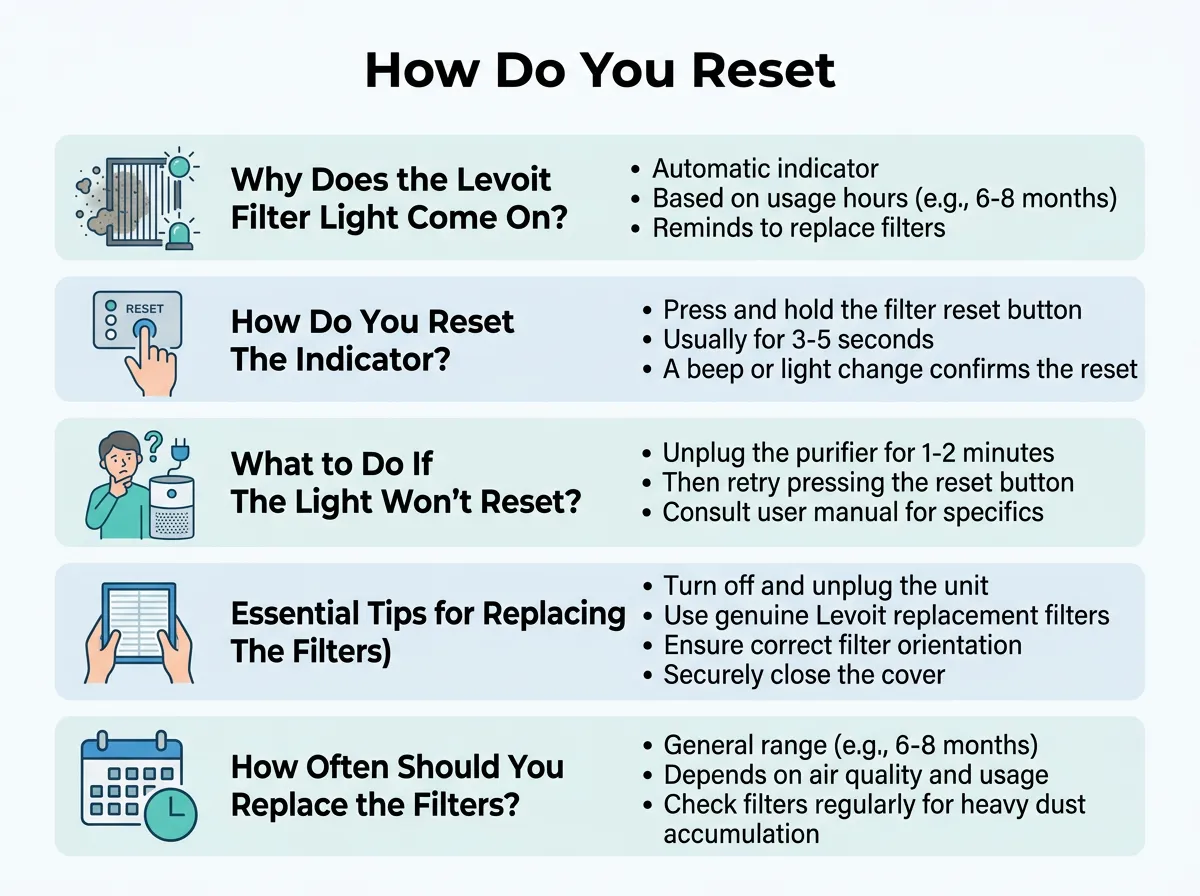
How Do You Reset the Filter Light on a Levoit Air Purifier? — key points at a glance
The Standard Method for Most Models
If you own a popular model like the Levoit Core 300, Core 400S, or Core 200S, this is the method for you. Follow these easy steps:
- Step 1: Keep the air purifier plugged in and turned on.
- Step 2: Look at the top control panel. Find the red light indicator. It looks like a small circle made of dotted lines.
- Step 3: Press your finger down on that red light icon. Hold it down firmly.
- Step 4: Keep holding for about three to five seconds.
- Step 5: Listen for a quick beep. As soon as you hear the beep, let go. The red light should turn off immediately.
The Alternate Method for Older Models
Some older or smaller models, like the Levoit LV-H132 or the Vista 200, might look a bit different. They might not have a dedicated red light icon. Instead, they might have a general “Filter Reset” button. For these models, you still want to keep the machine turned on. Press and hold the reset button for three seconds. You will hear a beep, and the light will go away. On some very old models, you may need to press the power button and hold it down for a few seconds to clear the light. Always look for the little light icon first.
What to Do If the Filter Light Will Not Turn Off
Sometimes, things do not go as planned. You press the button, you hold it down, but the red light stays on. This can be very annoying. Do not get mad at your machine just yet. There are a few simple reasons why this might happen.
Unplugging and Power Cycling
The first thing to try is a simple power cycle. Unplug your air purifier from the wall outlet. Wait for about one minute. This gives the internal computer a chance to shut down fully. While it is unplugged, press the power button a few times to drain any leftover power. Plug the machine back in. Turn it on, and try the reset steps again. This simple trick fixes most minor glitches.
Checking for Jammed Buttons
Levoit air purifiers use touch-sensitive panels. They do not have physical buttons that click down. Sometimes, dust or moisture can get on the control panel. This can make the touch sensor stop working. Take a soft, dry cloth. Gently wipe the top of the machine clean. Make sure your fingers are clean and dry too. When you press the button, make sure your whole finger covers the icon. This helps the sensor register your touch.
Essential Tips for Replacing Your Levoit Filter
Resetting the light is only half the job. You also need to make sure you put the new filter in correctly. If you do not, your machine will not work right. You might even damage the motor.
Always Remove the Plastic Wrap
This is the most common mistake people make. New filters come wrapped in a tight plastic bag. This bag keeps the filter clean during shipping. You must take this plastic bag off before you put the filter into the machine. If you leave the plastic on, no air can pass through. The machine will make a loud noise, and it will get very hot. Always double-check this step.
Choosing the Right Replacement Filter
Levoit makes many different filters for their machines. They have filters for pets, filters for smoke, and filters for allergies. Make sure you buy the exact model made for your machine. Check the model number on the bottom of your air purifier. Using a cheap, off-brand filter might save you money, but it might not fit perfectly. A bad fit means dirty air can leak around the sides of the filter.
How Often Should You Change Your Levoit Filter?
You now know how to turn off that red light. But how often should you expect to do this? The answer depends on a few different things.
Factors That Affect Filter Lifespan
If you have pets, your filter will get dirty very fast. Pet hair and dander fill up the filter quickly. If you smoke indoors, or if you live in an area with high pollution, your filter will also wear out sooner. In these cases, you might need to change your filter every three to four months. If you live in a clean, quiet home with no pets, your filter might last up to eight months or even a year.
Signs Your Filter Needs to Be Replaced Early
Do not wait for the red light if you notice these signs. First, look at the air flow. Is the air coming out of the machine very weak? Second, listen to the noise. Is the machine louder than usual? Third, smell the air. Does it smell dusty or musty when the machine runs? Finally, open up the machine and look at the filter. If it is dark grey or covered in a thick layer of dust, it is time to change it. You can reset the light early by holding the button down, even if the light has not turned red yet.
Enjoy Clean Air Every Single Day
Keeping your air clean does not have to be hard. Once you know how to handle the filter light, it becomes a simple chore. Your Levoit air purifier is built to keep your home safe and fresh. By replacing the filter and resetting the light, you make sure it can do its job for a long time. Keep this guide handy for the next time that red light starts to glow.
Frequently Asked Questions
Why is my Levoit filter light red after changing the filter?
The filter light stays red because the machine does not know you put in a new filter. You must manually reset the timer by pressing and holding the filter light button for three to five seconds. Once you hear a beep, the light will turn off.
Can I wash my Levoit HEPA filter instead of buying a new one?
No, you cannot wash a Levoit HEPA filter. Washing it with water will destroy the tiny fibers that trap dust and allergens. You can only vacuum the outer pre-filter to remove big hairs and dust.
How do I know if my Levoit filter needs a change before the light turns red?
You can check the color of the filter inside the machine. If it looks dark grey or is covered in a thick layer of dust, it is time to change it. You may also notice weak air flow or a musty smell.
How do you reset the light on a Levoit Core 300?
Make sure the machine is turned on. Press and hold the red light icon (the circle of dotted lines) on the top panel for three seconds. The machine will beep, and the red light will turn off.
Will the red light damage my air purifier if I ignore it?
The red light itself will not damage your air purifier. However, if you ignore it and keep using a dirty filter, the motor will have to work much harder. This can make the machine noisy and reduce its lifespan.
How often should I clean the outer pre-filter?
You should clean the outer pre-filter every two to four weeks. You can use a soft brush or a vacuum cleaner to gently remove the dust and pet hair on the outside of the filter.
